
Download kGTD – Free GTD Planner for Mac, Productivity App
kGTD is a lightweight, free‑of‑charge Getting Things Done (GTD) application built specifically for macOS. Designed for users who prefer a simple, calendar‑centric workflow, kGTD blends classic GTD concepts with tight iCal integration, making it easy to capture, organize, and review tasks without the bloat of modern cloud‑based suites. The current version 0.830, released on 24 October 2006, runs on Mac OS X and earlier releases, delivering a fast, offline‑first experience that respects your privacy. Over 1,600 downloads since its catalog debut attest to its reliability among Mac power users who value a no‑frills planner that stays out of the way while keeping every task, context, and project perfectly synchronized with the native Calendar app. Whether you’re a freelancer juggling multiple client projects or a student managing coursework, kGTD offers a clear, visual way to see what needs to be done today, this week, and beyond.
Key Features of kGTD
- Unified delete: removing a task from any view (Project, Action, iCal) instantly removes it everywhere.
- Editable tasks across all views – changes propagate in real time.
- Support for “single‑tasks” that live outside any project hierarchy.
- Quicksilver‑compatible task entry syntax for rapid context tagging.
- Renamable contexts directly from the Actions section.
- Dynamic subtask handling: child rows become notes or sub‑projects based on context.
- Age highlighting – tasks older than a user‑defined period are automatically marked.
- Automatic time‑stamp for completed tasks and configurable auto‑archive.
- Selective sync: temporarily disable projects from syncing.
- Auto‑sorting of projects, contexts, and next‑action items for faster navigation.
- Daily backup snapshots with easy rollback on sync errors.
- Template‑driven project creation for repetitive workflows.
- Alarm support on todo items with user‑defined reminders.
- Optional priority column that syncs with iCal, elevating next‑action tasks.
- Customizable calendar colors via font or background settings.
- Export utilities to generate iCal calendars for individual contexts or the whole task set.
Installation, Setup, and Daily Use
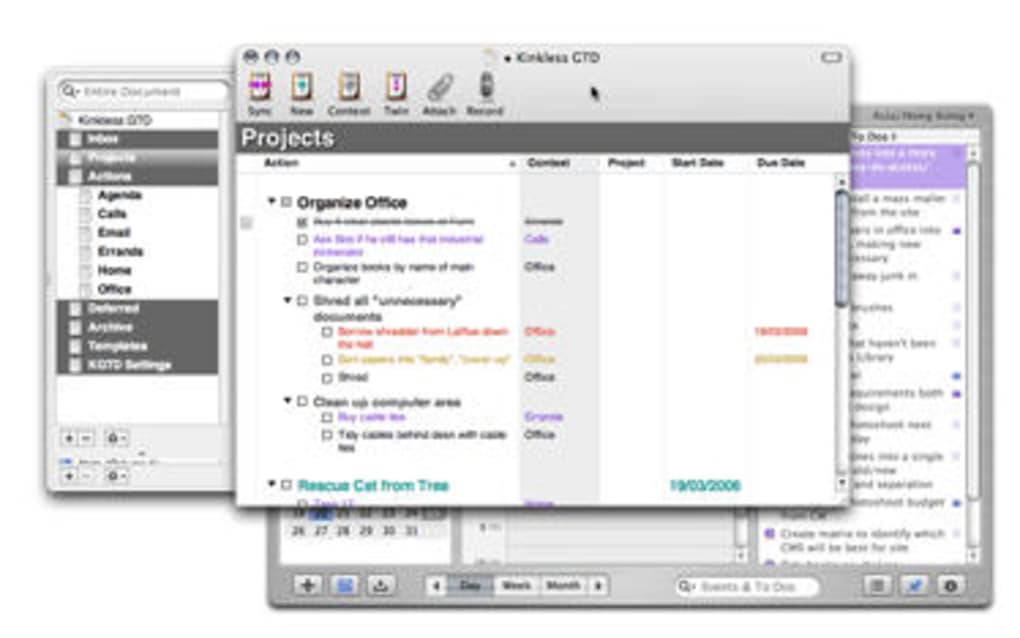
Getting started with kGTD is straightforward. Download the .dmg file from the official site, open it, and drag the kGTD icon into your Applications folder. The installer occupies less than 10 MB, making it one of the most storage‑efficient productivity tools on macOS. Upon first launch, kGTD walks you through a brief onboarding wizard that asks you to connect your iCal (now called Calendar) account. This connection is optional but highly recommended, as it enables two‑way syncing of tasks, due dates, and priority flags. After the sync is configured, you’ll see three primary panes: Projects, Actions (contexts), and the iCal view. To add a new task, click the “+” button in any pane or use the Quicksilver shortcut ⌘‑Space followed by “kgt” to open the quick‑add dialog. Enter the task description, assign a context, set a due date, and hit Enter – the task instantly appears in all relevant views. Daily workflow revolves around the “Next Actions” list, which bubbles up the most urgent items at the top of each context. As you complete tasks, they are time‑stamped and remain visible for a configurable period (default one day) before automatically moving to the archive. This visual feedback reinforces a sense of progress without cluttering your workspace. For power users, the template library allows you to pre‑define common project structures (e.g., “Blog Post Production” or “Client Onboarding”). Selecting a template creates a fully‑populated project with subtasks, contexts, and due dates, saving hours of manual entry. Regular backups are created each time you sync; you can revert to any previous day’s snapshot via the Settings → Backups panel, ensuring that accidental deletions or sync conflicts never become permanent setbacks.
Compatibility and System Requirements
kGTD is built exclusively for macOS. It runs on Mac OS X 10.4 Tiger and later, covering virtually every Mac released in the past decade. Because the application is a native Cocoa bundle, it integrates seamlessly with the system’s Calendar, Spotlight, and Quicksilver services. The software does not require an internet connection for core functionality; however, iCal syncing and backup storage operate over the network, so a stable Wi‑Fi or Ethernet link is recommended for those features. Memory consumption stays below 50 MB during typical use, and CPU usage is negligible, making kGTD an excellent choice for older MacBook models or low‑spec machines that struggle with modern, resource‑heavy task managers. The app is available in English only, and there are no separate mobile or Windows versions. Users looking for cross‑platform support will need to rely on alternative GTD tools, but Mac‑centric users will appreciate the tight integration that kGTD offers.
Pros and Cons
Pros
- Free and lightweight – minimal storage and CPU footprint.
- Deep iCal integration keeps tasks and calendar events in sync.
- Simple UI that focuses on core GTD principles without unnecessary clutter.
- Robust backup system with one‑click rollback.
- Highly customizable contexts, priorities, and project templates.
- Works offline – all data stays on your Mac, ensuring privacy.
- Quicksilver support speeds up task capture.
- Automatic sorting and age highlighting help maintain a clean workspace.
Cons
- Last official update was in 2006; no modern UI refresh.
- Lacks native iOS or Android companion apps.
- No built‑in collaboration or sharing features.
- Only available in English, limiting non‑English speakers.
- Advanced users may miss features like tagging, kanban boards, or AI suggestions.
kGTD remains a solid, no‑frills GTD solution for Mac users who value speed, privacy, and tight Calendar integration. While its interface feels dated, the core functionality is rock‑solid and the free price tag makes it a compelling choice for anyone looking to adopt the Getting Things Done methodology without subscribing to a cloud service.
Frequently Asked Questions
Is kGTD still safe to download and use?
Yes. The application is hosted on a reputable archive site and has no known malware. Because it runs locally on macOS and does not require an internet connection for core features, it poses minimal security risk.
Can I sync kGTD tasks with other calendar apps besides iCal?
kGTD syncs directly only with Apple Calendar (iCal). However, you can export iCal files and import them into other calendar applications that support the .ics format.
How do I back up my kGTD data?
Backups are created automatically each time you sync. You can find the daily backup files in the kGTD preferences folder, and you can restore any snapshot via Settings → Backups → Restore.
Is there a way to share projects with teammates?
kGTD does not include built‑in collaboration features. To share a project, you would need to export it as an .ics file and send it manually, or use a shared folder and sync the entire kGTD database between machines.
Can I set custom priorities for tasks?
Yes. kGTD offers an optional “priority” column that can be synced with iCal. If you don’t use it, next‑action tasks automatically receive a higher priority than other items.
Conclusion & Call to Action
For Mac users who crave a simple, offline GTD system, kGTD delivers exactly what it promises: a free, secure, and highly configurable planner that lives harmoniously with your Calendar. While it may lack the polish of modern SaaS tools, its reliability, tiny footprint, and extensive feature set—ranging from automatic backups to context‑driven templates—make it an excellent choice for anyone serious about mastering personal productivity on macOS. Ready to streamline your task management without paying a subscription fee? Download kGTD now and start organizing your projects, actions, and calendar events in one cohesive, free application.







